
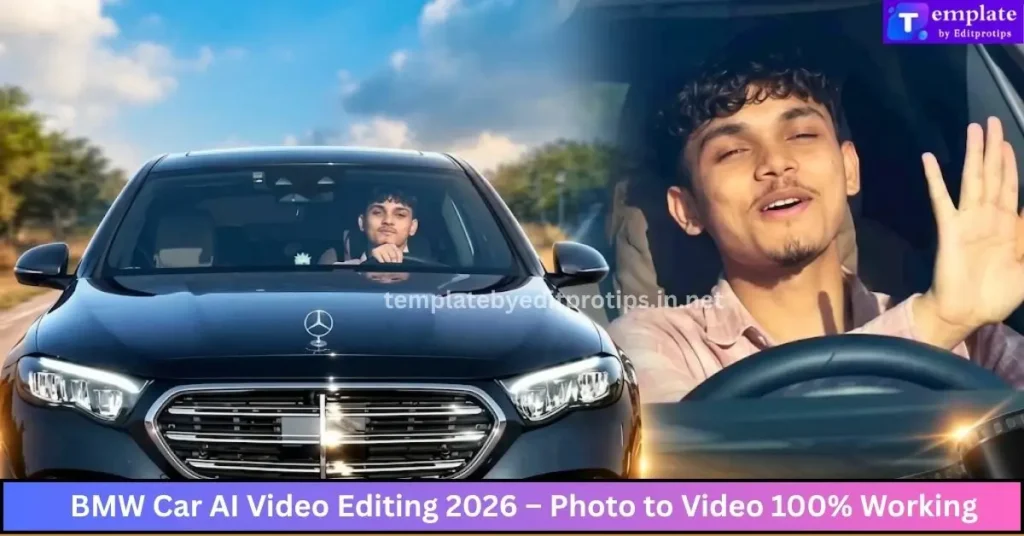
AI video editing has changed the way creators turn ordinary photos into eye-catching videos. Instead of spending hours creating keyframes, transitions, camera movements, and cinematic effects manually, you can now use AI-powered tools to transform a single car photo into a realistic video.
If you have a BMW photo and want to turn it into a stylish cinematic car video, the latest BMW car AI video editing techniques in 2026 can help you create impressive results with minimal editing experience.
In this guide, we’ll explain how to create a realistic BMW AI video from a photo, what prompts to use, how to make the movement look natural, and how to improve the final video for TikTok, Instagram Reels, YouTube Shorts, and other social platforms.
Table of Contents
What Is BMW Car AI Video Editing?
BMW car AI video editing is the process of using artificial intelligence to transform a BMW photograph into an animated or cinematic video.
Instead of recording a real car with a camera, an AI video generator can analyze the image and create motion around the vehicle. Depending on the tool and prompt you use, you can create effects such as:
- Cinematic camera movement
- Slow-motion car shots
- Realistic wheel movement
- Dynamic road scenes
- Moving backgrounds
- Headlight effects
- Camera zooms
- Tracking shots
- Rain and weather effects
- Luxury showroom scenes
- Night-time city environments
The basic concept is simple: upload a BMW image, describe the movement you want, generate the video, and refine the result with an editor.
Why BMW AI Videos Are Trending in 2026
Car content has always performed well on social media, but AI has made it easier for creators to produce professional-looking automotive content.
A single high-quality BMW photograph can become multiple different videos. For example, you could create a daytime highway scene, a night-time city sequence, or a cinematic studio shot without physically moving the car.
AI video editing is particularly useful for:
- Automotive creators
- BMW enthusiasts
- Social media editors
- YouTube Shorts creators
- Instagram creators
- TikTok editors
- Digital marketers
- Video editing beginners
- Car photography pages
The biggest advantage is flexibility. You can experiment with different camera angles and environments without having to reshoot the original photograph.
How to Create a BMW AI Video from a Photo
Creating a BMW photo-to-video edit generally requires only a few steps.
Step 1: Choose a High-Quality BMW Photo
Start with a clear, high-resolution BMW image.
For the best results, choose a photograph where:
- The car is clearly visible
- The vehicle is not heavily obstructed
- The background is reasonably clean
- The image has good lighting
- The BMW logo and body details are visible
- The camera angle is suitable for animation
A front three-quarter or side-angle photograph can work particularly well for cinematic car videos.
Avoid blurry or extremely low-resolution images because AI tools may have difficulty preserving small details.
Step 2: Upload the Photo to an AI Video Tool
Choose an AI image-to-video generator that supports image-based animation.
Upload your BMW photograph as the starting frame.
Depending on the platform, you may be able to select options such as:
- Video duration
- Aspect ratio
- Motion strength
- Camera movement
- Resolution
- Frame rate
- Creativity level
For social media, a vertical 9:16 format is usually suitable for Shorts, Reels, and TikTok-style content.
Step 3: Write a Detailed AI Video Prompt
Your prompt tells the AI what should happen in the scene.
Instead of writing something vague such as:
“Make this BMW move.”
Use a more descriptive prompt.
BMW Cinematic AI Video Prompt
Create a realistic cinematic video of the BMW shown in the reference image. Keep the exact BMW design, body shape, paint color, wheels, headlights, and proportions consistent with the original photo. Use a smooth cinematic camera movement that slowly moves around the front three-quarter angle of the car. Add realistic reflections, natural lighting, subtle environmental movement, realistic shadows, and professional automotive commercial cinematography. Keep the BMW sharp and detailed while the background has natural cinematic depth of field. Photorealistic, premium luxury car advertisement style, smooth motion, realistic physics, high detail.
This type of prompt gives the AI clearer instructions about what should remain unchanged and what should move.
BMW AI Video Prompt Ideas
You don’t have to create the same type of video every time. Try different prompts to create unique BMW edits.
1. Cinematic Highway Shot
Create a photorealistic cinematic BMW driving on a modern highway at sunset. Keep the original BMW design and color unchanged. Use a smooth tracking camera following the vehicle from a low rear three-quarter angle. Add realistic road motion, natural reflections, soft sunset lighting, and subtle motion blur. Premium automotive commercial style.
2. Night City BMW Video
Turn the BMW image into a realistic night-time cinematic scene in a modern city. Keep the vehicle's original shape, wheels, paint, and details unchanged. Add glowing city lights, realistic reflections on the body, wet asphalt, subtle fog, and smooth camera movement. Luxury automotive advertisement style, photorealistic lighting.
3. BMW Studio Advertisement
Create a premium automotive commercial featuring the BMW from the reference image inside a modern luxury studio. Slowly move the camera from the front grille toward the side of the vehicle. Use dramatic studio lighting, realistic reflections, detailed shadows, and a clean dark background. Preserve the exact BMW design and proportions.
4. Rainy BMW Cinematic Scene
Create a realistic cinematic BMW scene during light rain. Preserve the original vehicle details and paint color. Add realistic raindrops, wet reflections, headlights glowing naturally, water on the road, and a slow cinematic camera movement. Photorealistic automotive photography and commercial video style.
How to Make the BMW Video Look More Realistic
One of the biggest challenges with AI-generated car videos is maintaining consistency.
The vehicle may sometimes change shape, wheels, lights, badges, or other details during animation.
To reduce these problems, use prompts that clearly tell the AI to preserve the original vehicle.
Include phrases such as:
- “Keep the original BMW design unchanged.”
- “Preserve the exact body proportions.”
- “Keep the original wheels.”
- “Do not alter the headlights.”
- “Maintain the original paint color.”
- “Preserve the BMW logo and grille.”
- “Keep the vehicle identity consistent throughout the video.”
You should also avoid asking for too many complicated movements at the same time.
For example, asking the AI to rotate the entire car, change the environment, add rain, change the lighting, and perform a rapid camera zoom may produce inconsistent results.
A simple camera movement often looks more realistic.
Best Camera Movements for BMW AI Videos
Camera movement has a major impact on the final result.
Slow Push-In
The camera gradually moves toward the BMW.
This works especially well for dramatic introductions.
Orbit Shot
The camera slowly moves around the front or side of the vehicle.
This can create a premium automotive-commercial appearance.
Tracking Shot
The camera follows the BMW as if the vehicle is driving.
This is useful for highway and city scenes.
Low-Angle Shot
The camera stays close to ground level and looks slightly upward.
This can emphasize the size and design of the car.
Side Tracking
The camera moves parallel to the vehicle.
It works particularly well when creating driving sequences.
Editing the AI-Generated BMW Video
After generating the video, you can bring the result into your preferred video editor for final adjustments.
Consider adding:
- Cinematic transitions
- Speed ramps
- Background music
- Sound effects
- Engine sounds
- Text overlays
- Color adjustments
- Motion blur
- Light effects
- Subtle sharpening
For short-form content, keep the introduction visually interesting. The first few seconds should immediately show the BMW and the main visual effect.
You can also combine several AI-generated clips to create a longer automotive montage.
For example:
Clip 1: BMW front shot
Clip 2: Camera moves around the vehicle
Clip 3: BMW driving through a city
Clip 4: Close-up of headlights
Clip 5: Final cinematic logo shot
This structure can create a short automotive advertisement from only a few generated clips.
Best Aspect Ratio for BMW AI Videos
Choose your aspect ratio based on where you plan to publish the video.
| Platform | Recommended Format |
|---|---|
| TikTok | 9:16 |
| Instagram Reels | 9:16 |
| YouTube Shorts | 9:16 |
| Instagram Feed | 4:5 or 1:1 |
| YouTube Videos | 16:9 |
| Facebook Reels | 9:16 |
For vertical short-form content, 1080 × 1920 is a common target resolution.
If your original image is horizontal, you may need to crop or extend the composition before generating the video.
Common BMW AI Video Editing Mistakes
AI can produce impressive results, but poor prompts can lead to unnatural footage.
Changing the Car’s Design
One common problem is that the AI changes wheels, body panels, headlights, or other vehicle details.
Solution: Tell the AI to preserve the original vehicle identity.
Excessive Motion
Too much movement can make the video look artificial.
Solution: Start with subtle camera movement and increase motion gradually.
Unrealistic Wheels
AI-generated driving scenes may sometimes produce unusual wheel or tire movement.
Solution: Use prompts requesting realistic vehicle physics and natural wheel motion.
Background Distortion
Buildings, roads, signs, and other background elements may become distorted.
Solution: Use a relatively simple background or reduce the amount of environmental movement.
Overusing Effects
Adding excessive glow, particles, fog, and transitions can make the video look less realistic.
Solution: Use effects selectively and prioritize realistic lighting and shadows.
BMW AI Video Editing Workflow
A simple workflow can help you consistently produce better results.
1. Select the BMW image
Choose a sharp, high-quality photograph.
2. Prepare the composition
Make sure the car is positioned correctly for the desired camera movement.
3. Write the prompt
Describe the camera movement, environment, lighting, and desired realism.
4. Generate the first version
Don’t worry if the first result isn’t perfect.
5. Adjust the prompt
Specify any details that were incorrectly generated.
6. Generate additional versions
Compare the results and choose the most consistent clip.
7. Edit the final footage
Add music, sound effects, transitions, and color adjustments.
8. Export for your platform
Use the appropriate aspect ratio and resolution.
Tips for Viral-Style BMW AI Edits
There is no guaranteed formula for making a video viral, but strong visual presentation can make automotive content more engaging.
Try these ideas:
- Start with a close-up of the BMW grille.
- Use a dramatic camera reveal.
- Add a short engine sound effect.
- Create a night-time city scene.
- Use smooth slow-motion movement.
- Experiment with dramatic lighting.
- Keep the video short and visually focused.
- Use a strong first frame.
- Match cuts to the music beat.
- Add minimal, readable text.
You can also create several variations from the same BMW photo and test different visual styles.
Frequently Asked Questions
Can I turn a BMW photo into a video using AI?
Yes. Image-to-video AI tools can animate a BMW photograph and generate camera movement, environmental motion, and cinematic effects based on your instructions.
Do I need video editing experience?
No. Basic AI video generation can be done without advanced editing knowledge. However, learning simple editing techniques such as trimming, transitions, audio synchronization, and color correction can improve the final result.
What type of BMW photo works best?
A sharp, high-resolution image with the complete vehicle clearly visible generally provides a better starting point. Front three-quarter and side-angle photographs are particularly useful for cinematic camera movements.
Can AI make a BMW look like it is driving?
Yes. Some image-to-video systems can generate driving-style motion. Results vary, so using a detailed prompt requesting realistic road movement, wheel motion, shadows, and vehicle physics can help.
Can I create a BMW AI video for Instagram or YouTube Shorts?
Yes. For vertical short-form platforms, a 9:16 composition is generally appropriate. Make sure important parts of the vehicle and any text remain inside the visible area.
Why does my AI-generated BMW change during the video?
AI video generation can sometimes alter vehicle details between frames. Strong reference images, simpler motion, shorter clips, and prompts emphasizing consistency can help reduce these changes.
Conclusion
BMW car AI video editing in 2026 makes it possible to transform a single photograph into a cinematic automotive video without needing a physical camera setup.
The key to better results is not simply generating more effects. Start with a high-quality BMW photo, use a clear prompt, choose a controlled camera movement, and emphasize consistency throughout the animation.
Once you have generated your AI clip, finish it with music, sound effects, transitions, color adjustments, and platform-specific formatting.
Whether you’re creating content for TikTok, Instagram Reels, YouTube Shorts, or your own automotive page, experimenting with different BMW photo-to-video styles can help you create unique visual content.
For more AI editing ideas, templates, tutorials, and creative editing resources, explore Template by Editprotips and experiment with new ways to turn simple images into engaging videos.

